 JIJI LABS
 SHIPSAFE
Assume the key is compromised
GitHub's own guidance is to treat any leaked secret as already compromised, because removing it from the code does not stop someone who already copied it. Automated scrapers watch public repositories, and Stripe notes that even private repositories can be exposed through development environments. You do not need proof that anyone used the key. Rotate it anyway.
Step 1: Revoke or rotate the key at the provider
GitHub calls this the most important remediation step: revoking the secret with the secret's provider. Open the provider's dashboard (Stripe, OpenAI, Anthropic, Google Cloud, AWS, Slack, and so on), delete or roll the leaked key, and create a replacement.
- If production traffic depends on the key, create the new key first, switch your app to it, then revoke the old one. For a key that is actively being abused, revoke immediately and accept a short outage.
- Provider-specific walkthroughs: Stripe, OpenAI, Anthropic and Gemini.
- Some providers also react on their own. Anthropic, for example, takes part in GitHub's secret scanning partner program and deactivates keys that GitHub finds in public repositories. Do not wait for that. Revoke it yourself.
Step 2: Check for abuse
Look at the provider's usage and audit logs for the window between the commit time and the revocation. You are looking for requests from places or at volumes that do not match your app, new resources you did not create, and unexpected charges. GitHub also suggests reviewing its audit logs for events related to the secret.
- Find when the key was committed:
git log -S "the-key-prefix" --all --oneline(use only the first few characters). - Note the time. It marks the start of the exposure window.
- If you see abuse, follow the provider's incident steps and contact their support.
Step 3: Replace the key everywhere it ran
Search your whole project and your CI settings for the old value. Put the new one in an environment variable or your host's secret store, never in source files, then redeploy. Check these easily forgotten places: CI logs and variables, Docker images and build args, local .env copies on teammates' machines, mobile app builds that already shipped, and shared notes or chat messages.
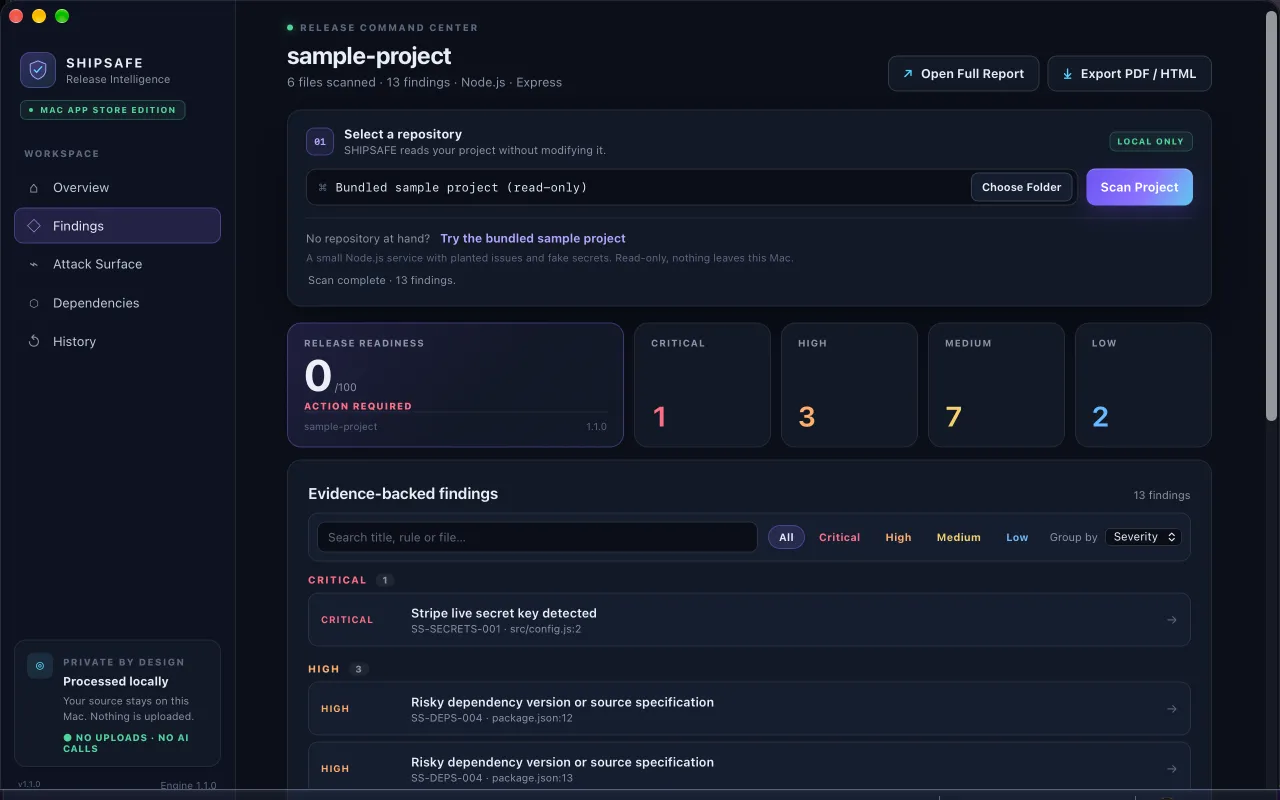
A leaked key is rarely alone. SHIPSAFE, a Mac app that runs entirely on your machine, scans the files of a project folder for keys in known formats, hard-coded passwords, private keys and committed .env files. It reads the current files, not your git history, so it will not find a key that only exists in an old commit. See it on the Mac App Store.
Step 4: Clean the repository (optional once the key is dead)
Once the key is revoked, the old commit is only a leftover. Removing it from history is still good hygiene, but it is disruptive: it rewrites commit hashes and needs a force-push. GitHub says to weigh it with your security lead before doing it. The full procedure is in How to remove a .env file from git history.
Forks, other clones and cached views can keep the old commit alive. That is one more reason to rely on revocation, not on deletion.
Step 5: Make the next leak harder
- Add
.envand other secret files to.gitignoreand commit that change. - Turn on GitHub push protection, which blocks pushes that contain recognised secrets.
- Add a pre-commit hook with a scanner such as gitleaks or git-secrets.
- Stage files by name instead of
git add ., and readgit diff --cachedbefore committing. - Keep real keys out of code that AI coding tools generate. Ask them to read from environment variables, and review what they commit. See the pre-release checklist for AI-built apps.
A sensible order for the first hour
- Revoke or rotate the key at the provider.
- Deploy the replacement from a secret store.
- Read the usage and audit logs for the exposure window.
- Search the project, CI and old builds for other copies.
- Turn on push protection, then plan the history cleanup.
Frequently asked questions
Is deleting the commit or the file enough?
No. Anyone who cloned, forked or scraped the repository while the key was visible still has it. Only revoking the key at the provider makes it useless.
Do I need to rewrite git history after I rotate the key?
Not to stay safe. Once the key is revoked, the old value cannot be used. Rewriting history is optional cleanup, and GitHub warns it is disruptive because it needs force-pushes and changes commit hashes.
Will the provider revoke a leaked key for me?
Sometimes. Anthropic deactivates keys that GitHub finds in public repositories, and Stripe says it may notify you or deactivate a key it detects. Neither is guaranteed, so revoke the key yourself.
Official documentation used for this guide
Vendor interfaces change. If a menu looks different, follow the linked documentation.
- GitHub Docs: Remediating a leaked secret
- GitHub Docs: Removing sensitive data from a repository
- GitHub Docs: About push protection
- Stripe Docs: Best practices for managing secret API keys
- Anthropic Help Center: API key best practices