 JIJI LABS
 SHIPSAFE
This is a checklist, not a guarantee. It reduces the common, avoidable mistakes. It does not replace testing, a security review for sensitive apps, or the provider's own guidance.
1. Secrets
- Search the project for key formats and words like
secret,token,passwordandapikey. Check config files and tests too. - Confirm
.envand similar files are in.gitignoreand not tracked:git ls-files | grep -i env. - Look at git history for secrets that were committed and removed. See removing a .env file from git history.
- If any real key ever appeared in code, a prompt, a screenshot or a commit, rotate it. See the first-hour plan.
- No secret keys in a mobile or browser app. See hard-coded keys in iOS apps.
2. Debug and development settings
- Debug mode, verbose error pages and development environment flags are off in the deployed configuration.
- No
localhostURLs in deployable config. - TLS verification is not disabled anywhere (look for options that skip certificate checks).
- Session cookies use the Secure and HttpOnly flags.
- CORS does not allow every origin (
*) for an API that uses cookies or tokens. - iOS: App Transport Security is not switched off. See ATS exceptions. The Release build does not carry the
get-task-allowdebug entitlement or a development push environment.
3. Who can call what
- List every route. For each admin, billing, export or delete route, find the line that checks the caller's identity and permission.
- AI-generated endpoints often check that a user is signed in but not that the record belongs to them. Test with two accounts.
- If you use Supabase or Firebase, confirm Row Level Security or Security Rules are on. See which keys are safe and what protects the data.
4. Data and input
- Database queries use parameters, not strings built from user input.
- Migrations you are about to run do not drop or truncate data by accident. Read generated migrations before applying them to production.
- Error responses do not return stack traces, SQL or environment details.
5. Dependencies
- A lockfile is committed, so installs are repeatable.
- Check that every package the AI tool added is real, maintained and the one you meant. Look for slightly misspelled names.
- Run your package manager's audit command and read the output.
- Remove packages you do not use.
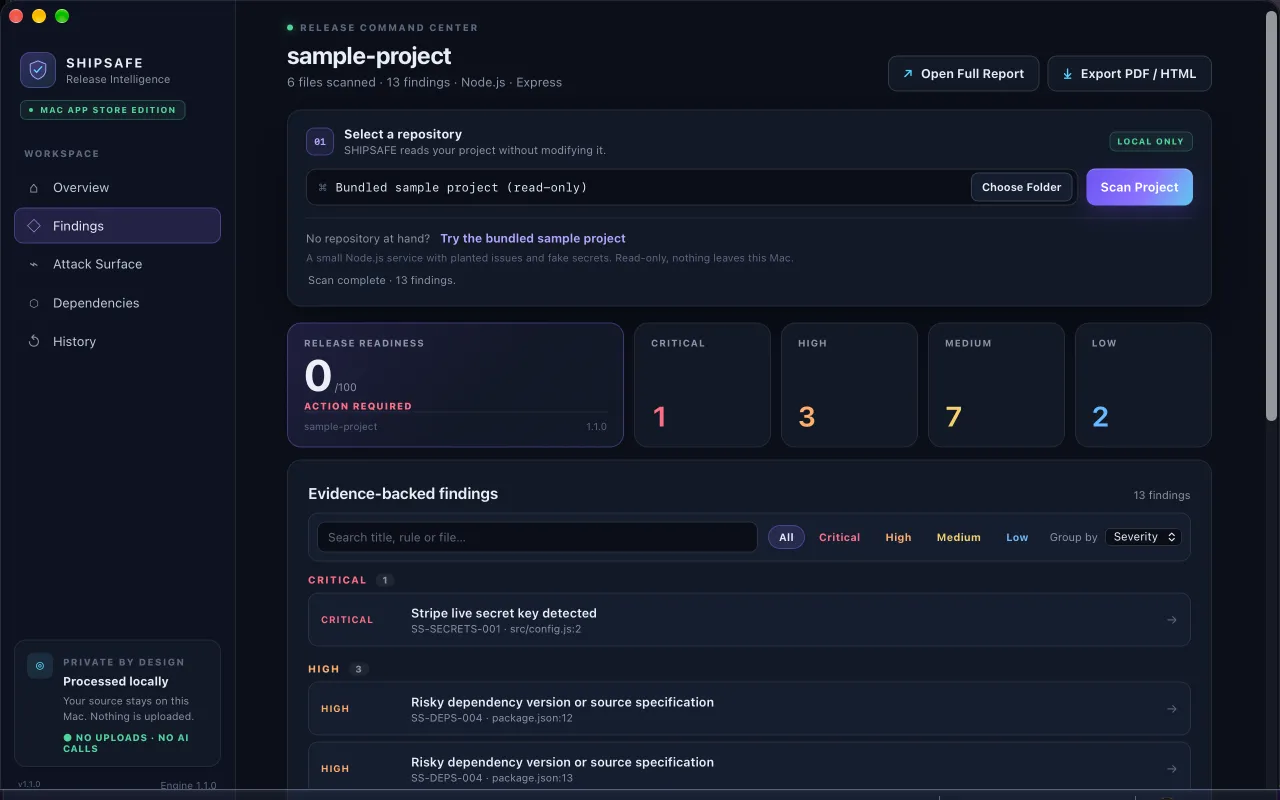
Much of this list can be checked by a scanner. SHIPSAFE for Mac scans a project folder locally and reports hard-coded secrets, debug and development settings left on, admin and sensitive routes without an evident authentication guard, risky dependency versions and missing lockfiles, destructive database migrations, injection risks, and leftover TODOs and console logging, each with file, line and a suggested fix. It is a review assistant: findings can include false positives or miss context, so you still make the release decision. Mac App Store page.
6. Logs and leftovers
- Remove
console.log,printand debug output that prints tokens, passwords or full request bodies. - Resolve or delete TODO and FIXME comments that mark skipped security work, such as "add auth later".
- Delete test accounts, seed data and sample admin users.
7. Final steps before you ship
- Build the release configuration, not the debug one, and test it.
- Set spend limits on every paid API the app uses. See AI API keys: spend limits.
- Turn on push protection in your repository so the next secret is blocked at push time.
- Write down how to revoke each key you use, so a leak is a five-minute job.
A scan or a checklist cannot guarantee that software is secure, compliant or accepted by any store. Use them to catch the obvious problems early.
Frequently asked questions
Is AI-generated code less secure than hand-written code?
Not automatically, but it is often written without your production context. It tends to include inline keys, debug flags and unprotected routes, so it needs the same review as any code from a new contributor.
What is the single most important check before release?
Make sure no secret key is in the code, the repository history or the shipped app, and that any key that ever leaked has been revoked.
Does a clean scan mean my app is secure?
No. A scan catches known patterns and common release mistakes. It cannot prove the absence of bugs, so combine it with testing and review.
Official documentation used for this guide
Vendor interfaces change. If a menu looks different, follow the linked documentation.
- GitHub Docs: About push protection
- GitHub Docs: Removing sensitive data from a repository
- Stripe Docs: Best practices for managing secret API keys
- Supabase Docs: Understanding API keys
- Apple Developer: Preventing insecure network connections